Digitizing The Commonwealth of Oceana
After selecting The Commonwealth of Oceana for this project, I sought permission to digitize a portion of the book. The process required collaboration with staff at the Center for Digital Research in the Humanities (CDRH) and in the University's Archives & Special Collections.
Although researchers are permitted to photograph materials in the reading room, formal digitization of rare books is usually performed by Archives & Special Collections staff. My request to carry out the scanning myself was therefore unusual. Since this project merges book history and digital humanities, I explained that direct experience with digitizing rare materials was central to my goals. After discussion, the Archives & Special Collections Chair approved my request and confirmed the pages I selected were stable enough to scan. An archivist supervised the process to ensure the book's safe handling.
The scanning was conducted at the CDRH using a Zeutschell OS 14000 A2, an overhead scanner made specifically for rare and oversized materials. Unlike a flatbed scanner, which presses a book against a glass surface, the Zeutschel scanner is designed to support fragile bindings. Its adjustable dual-plate book cradle allows volumes to rest at an angle, reducing strain on the spine while pages are photographed from above.
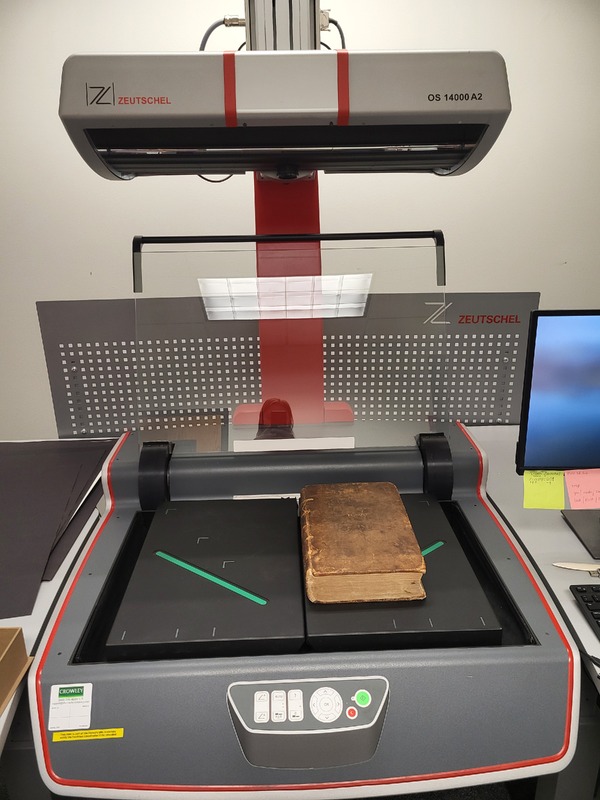


In some cases, a glass plate can be lowered to hold loose pages flat during scanning. For Oceana, this was not necessary. The book's broken spine allowed it to easily rest open, and only minimal adjustments to the scanner's cradle were necessary. Working carefully, I scanned each page individually.
The scanner operates using Omniscan sofware, which captures images as high-resolution TIFF files. TIFF files are widely used in digital preservation because they retain a large amount of visual information and do not compress the image data. After completing the scans, I saved the TIFF files to a thumb drive and transferred them to my computer for processing.
To prepare the images for use in the online exhibit, I used Adobe Bridge to batch-convert the TIFF files into JPEG (.jpg) format. While TIFF files are ideal for long-term preservation, JPEG images are smaller and load more efficiently on web platforms such as Omeka S.
The digitization process illustrates the collaborative and technical labor that underlies digital humanities projects. Archivists ensured the safe handling of a fragile seventeenth-century book, digital humanities staff provided access to specialized equipment, and image-processing tools transformed the scans into files suitable for online preservation. Through this process, a fragile physical object can be made more widely accessible while preserving the traces of its history for future readers.